Webflow: Create an effective SaaS website

Publié le

4/3/26

-

5 min

SaaS Webflow website

Sommaire

Résumer cet article avec une IA

=


Software as a service (SaaS) refers to business models that are hosted on a remote server and accessible via a web browser. They are becoming increasingly popular because they offer many advantages to businesses, including reduced costs, greater flexibility, and improved scalability.

A SaaS site is a website that offers software as a service. It is therefore a website that offers a software solution via a web browser on a home page. To put your SaaS site online, you'll also need to think about optimizing it to attract and convert visitors. With Webflow, the essential tool for creating a professional website without a line of code, you can design your projects without being an expert in web design. In this article, we'll look at how to create an effective SaaS site with Webflow.

The advantages of Webflow for SaaS websites

Webflow offers several advantages for SaaS websites, which we present in the table below:
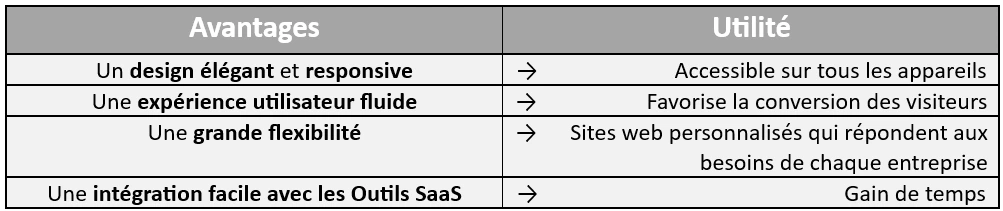
Webflow offers a multitude of advantages for SaaS websites, including elegant and responsive design, a smooth user experience, great flexibility, and easy integration with SaaS tools. Now let's take a look at the best way to create an effective SaaS website with Webflow.

How to create a SaaS website with Webflow (the practical guide)

Here are the steps to follow to create a SaaS website with Webflow:

Choose a template

Webflow offers a wide range of pre-designed templates that can be used as a starting point for creating your SaaS website.

Choosing your template in Webflow is an important step in creating your website because it will determine the design, structure, and functionality of your site.

Here are a few things to consider when choosing a template in Webflow:

  • The type of website you want to create: Webflow offers a wide range of templates, each suited to a specific type of website. If you want to create a website for a business, you will need a different template than you would for a blog or online store. Find out how to choose the right template in Our Ultimate Guide to Webflow Templates
  • Your graphic charter: If you have a graphic charter, make sure you choose a template that complies with it. This will allow you to create a website that is consistent with your brand image.
  • Your specific needs: Think about the specific features you need for your website. If, for example, you want to sell products online, you will need a template with a shopping cart.

Here are our final three tips to help you choose your template:
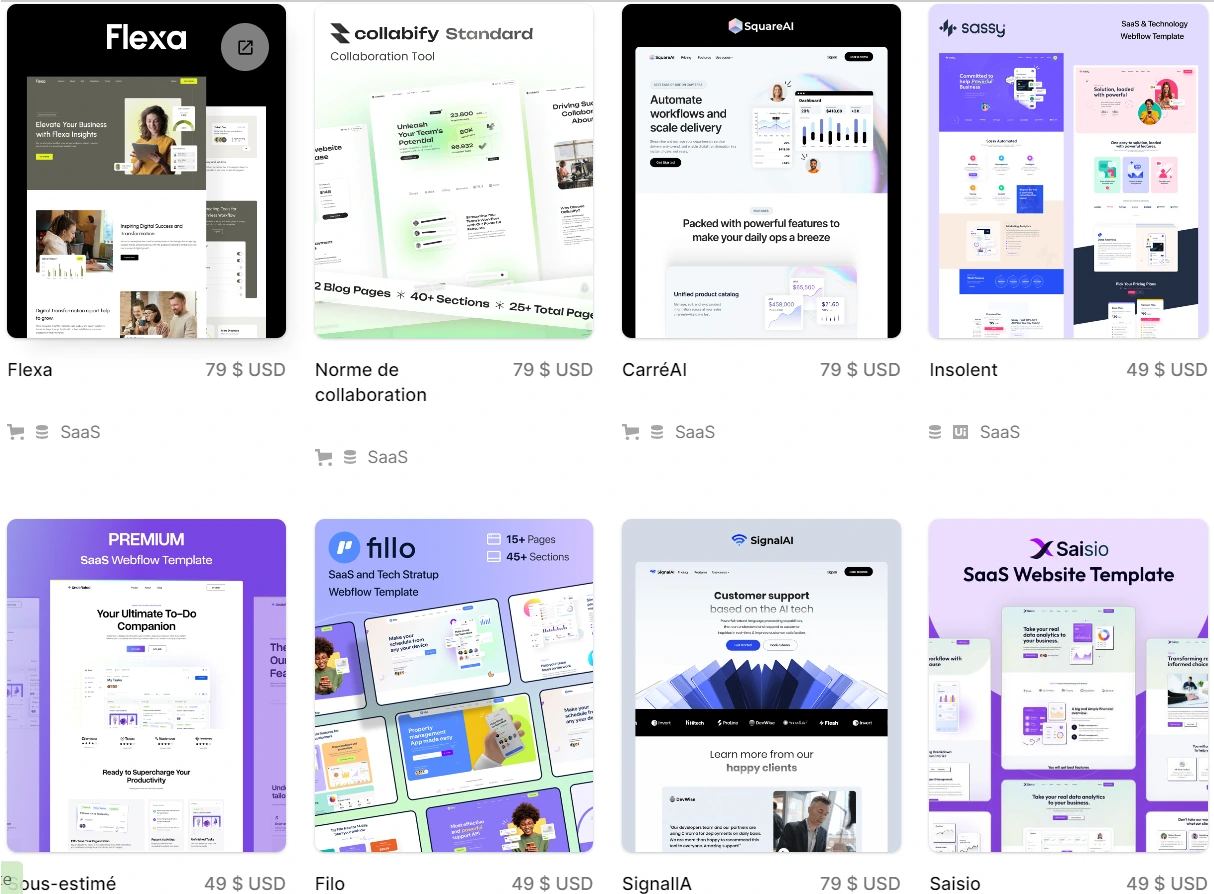
  • Do your research: Take the time to research and compare different options. Visit the Webflow template library and browse the different templates available.
  • Read reviews: Check out user reviews for each template before making your decision. This will help you make an informed choice.
  • Try before you buy: Webflow offers a free trial version of all its templates. This allows you to test the template before purchasing it.
Templates Webflow
Above are a few examples of templates you'll find in Webflow.

Customize your site

Once you've chosen a template, you can customize it to suit your needs. You can modify the template's design, content, and features.

Here are some elements you can customize in a Webflow template:

  • Color: change the color of template elements such as headings, paragraphs, and buttons
  • Font: Change the font of template elements
  • Images: Add or remove images from the template
  • Content: customize the content of the template based on what you want to highlight
  • Features: Add or remove features from the template.

Integrate your SaaS tools

If you use SaaS tools, you can integrate them into your Webflow website. This will allow users to enjoy a consistent user experience (UX).

Webflow offers easy integration with SaaS tools. You can integrate them in several ways:

  • Via widgets: Webflow offers a library of pre-designed widgets that allow you to integrate SaaS tools into your website. These widgets are easy to add and configure.
  • Via custom code: If you have specific needs, you can integrate SaaS tools into your website via custom code. This will allow you to create an integration that meets your exact needs and those of your customers.

Here are some examples of common SaaS integrations with Webflow:

  • CRM integration: You can integrate a CRM with your Webflow website to track leads and customers.
  • Marketing automation integration: You can integrate a marketing automation tool with your Webflow site to automate your marketing campaigns
  • Payment integration: You can integrate a payment tool with your Webflow site to allow users to pay for your products or services.

You can also learn more about the different integrations compatible with Webflow in the article opposite: Our Webflow Integrations.

To integrate a SaaS tool with your Webflow site, you need to follow these steps:

  1. Choose the SaaS tool you want to integrate: Look for a SaaS tool that meets your needs and is compatible with Webflow.
  2. Obtain the integration information: The SaaS tool you choose will provide you with the integration information you need. This information may include API keys, URLs, or codes
  3. Add the widget or custom code: If the SaaS tool you choose offers a widget, you can simply add it to your Webflow site. If you need to use custom code, you will need to add it to your Webflow site via the code editor
  4. Configure the integration: Once you've added the widget or custom code, you'll need to configure the integration. This may involve entering the integration information and customizing its appearance.

Finally, be sure to read the SaaS tool's documentation (detailed instructions on how to integrate the tool with your Webflow site) and test the integration to ensure it is working properly.

By following these tips, you can integrate SaaS tools into your Webflow site to create a consistent and effective user experience.

Optimize your site for SEO

It's important to optimize your site for SEO so that it ranks well in search results.

Search engine optimization (SEO) is the process of improving your website with the goal of making it more visible in search engine results pages (SERPs). There are many SEO techniques you can use to improve your ranking, but some of the most important ones are:

  • Choosing the right keywords
  • Creating quality content
  • Build inbound links
  • Optimizing your site for mobile devices
  • Updating your site regularly

You will also find details on how to optimize your Webflow site for SEO in our article on creating an e-commerce site.

Conclusion

Webflow is a powerful and flexible website creation platform that offers many advantages for SaaS websites. By following the steps outlined above, you can create an effective SaaS website that will attract and convert your visitors. Please note that the digital agency EasyWeb can assist you in creating your SaaS website in Webflow. Our teams of experts will be happy to provide you with a 100% free audit of your web project.


Alexis Chretinat - Business Strategist
Moi c’est Alexis et ensemble on va aire le point sur où vous en êtes et ce qui est possible de faire d’un point de vue tech, financement et commercial =)

Alors,
on commence ?